쿠버네티스 기본 개념에 대해 알아보려고 한다.
Pod
쿠버네티스 노드는 여러 Pod로 구성될 수 있고, 각 Pod는 여러 Container를 가질 수 있다.
@cloudshell:~ (proud-curve)$ kubectl explain pods
KIND:       Pod
VERSION:    v1

DESCRIPTION:
    Pod is a collection of containers that can run on a host. This resource is
    created by clients and scheduled onto hosts.

FIELDS:
  apiVersion    <string>
    APIVersion defines the versioned schema of this representation of an object.
    Servers should convert recognized schemas to the latest internal value, and
    may reject unrecognized values. More info:
    https://git.k8s.io/community/contributors/devel/sig-architecture/api-conventions.md#resources

  kind  <string>
    Kind is a string value representing the REST resource this object
    represents. Servers may infer this from the endpoint the client submits
    requests to. Cannot be updated. In CamelCase. More info:
    https://git.k8s.io/community/contributors/devel/sig-architecture/api-conventions.md#types-kinds

  metadata      <ObjectMeta>
    Standard object's metadata. More info:
    https://git.k8s.io/community/contributors/devel/sig-architecture/api-conventions.md#metadata

  spec  <PodSpec>
    Specification of the desired behavior of the pod. More info:
    https://git.k8s.io/community/contributors/devel/sig-architecture/api-conventions.md#spec-and-status

  status        <PodStatus>
    Most recently observed status of the pod. This data may not be up to date.
    Populated by the system. Read-only. More info:
    https://git.k8s.io/community/contributors/devel/sig-architecture/api-conventions.md#spec-and-status
한 Pod에 있는 컨테이너들은 리소스를 공유하고 같은 Pod에 있는 컨테이너들은 내부 IP를 통해 통신한다.
1. get pods를 통해 pod 리스트를 확인할 수 있다.
@cloudshell:~ (proud-curve)$ kubectl get pods
NAME                                  READY   STATUS    RESTARTS   AGE
hello-world-rest-api-8c7449fd-f7lh2   1/1     Running   0          16h
@cloudshell:~ (proud-curve)$ kubectl get pods -o wide
NAME                                  READY   STATUS    RESTARTS   AGE   IP          NODE                                                 NOMINATED NODE   READINESS GATES
hello-world-rest-api-8c7449fd-f7lh2   1/1     Running   0          16h   10.44.1.5   gke-in28minutes-cluster-default-pool-24f9f7fb-xq70   <none>           <none>
2. 특정 pod에 대해 상세 조회를 하려면 1번 단계에서 확인한 pod name을 이용해서 kubectl describe pod를 하면 된다.
@cloudshell:~ (proud-curve)$ kubectl describe pod hello-world-rest-api-8c7449fd-f7lh2
Name:             hello-world-rest-api-8c7449fd-f7lh2
Namespace:        default
Priority:         0
Service Account:  default
Node:             gke-in28minutes-cluster-default-pool-24f9f7fb-xq70/10.128.0.7
Start Time:       Sun, 16 Feb 2025 03:44:56 +0000
Labels:           app=hello-world-rest-api
                  pod-template-hash=8c7449fd
Annotations:      cloud.google.com/cluster_autoscaler_unhelpable_since: 2025-02-15T13:37:43+0000
                  cloud.google.com/cluster_autoscaler_unhelpable_until: Inf
Status:           Running
IP:               10.44.1.5
IPs:
  IP:           10.44.1.5
Controlled By:  ReplicaSet/hello-world-rest-api-8c7449fd
Containers:
  hello-world-rest-api:
    Container ID:   containerd://a5f84557e8c2e25fe5ba0e04bcabac8f9b77cbfbb491b98846169c71687f5c1e
    Image:          in28min/hello-world-rest-api:0.0.1.RELEASE
    Image ID:       docker.io/in28min/hello-world-rest-api@sha256:00469c343814aabe56ad1034427f546d43bafaaa11208a1eb0720993743f72be
    Port:           <none>
    Host Port:      <none>
    State:          Running
      Started:      Sun, 16 Feb 2025 03:45:15 +0000
    Ready:          True
    Restart Count:  0
    Environment:    <none>
    Mounts:
      /var/run/secrets/kubernetes.io/serviceaccount from kube-api-access-d2tdw (ro)
Conditions:
  Type                        Status
  PodReadyToStartContainers   True
  Initialized                 True
  Ready                       True
  ContainersReady             True
  PodScheduled                True
Volumes:
  kube-api-access-d2tdw:
    Type:                    Projected (a volume that contains injected data from multiple sources)
    TokenExpirationSeconds:  3607
    ConfigMapName:           kube-root-ca.crt
    ConfigMapOptional:       <nil>
    DownwardAPI:             true
QoS Class:                   BestEffort
Node-Selectors:              <none>
Tolerations:                 node.kubernetes.io/not-ready:NoExecute op=Exists for 300s
                             node.kubernetes.io/unreachable:NoExecute op=Exists for 300s
Events:                      <none>
여기에서 Labels에 있는 이름이 중요하다. 나중에 리플리카셋이나 서비스 등으로 Pod을 묶을 때 쓰일 수 있다. 그리고 Annotation은 Pod에 대한 메타 정보이다.
Replicaset
리플리카셋은 Pod를 모니터링 하고 있다가 필요한 Pod 수보다 줄어들게 되면 다시 Pod를 생성한다. 특정 수 이상의 Pod이 실행되도록 만들어준다.
@cloudshell:~ (proud-curve)$ kubectl explain replicaset
GROUP:      apps
KIND:       ReplicaSet
VERSION:    v1

DESCRIPTION:
    ReplicaSet ensures that a specified number of pod replicas are running at
    any given time.

FIELDS:
  apiVersion    <string>
    APIVersion defines the versioned schema of this representation of an object.
    Servers should convert recognized schemas to the latest internal value, and
    may reject unrecognized values. More info:
    https://git.k8s.io/community/contributors/devel/sig-architecture/api-conventions.md#resources

  kind  <string>
    Kind is a string value representing the REST resource this object
    represents. Servers may infer this from the endpoint the client submits
    requests to. Cannot be updated. In CamelCase. More info:
    https://git.k8s.io/community/contributors/devel/sig-architecture/api-conventions.md#types-kinds

  metadata      <ObjectMeta>
    If the Labels of a ReplicaSet are empty, they are defaulted to be the same
    as the Pod(s) that the ReplicaSet manages. Standard object's metadata. More
    info:
    https://git.k8s.io/community/contributors/devel/sig-architecture/api-conventions.md#metadata

  spec  <ReplicaSetSpec>
    Spec defines the specification of the desired behavior of the ReplicaSet.
    More info:
    https://git.k8s.io/community/contributors/devel/sig-architecture/api-conventions.md#spec-and-status

  status        <ReplicaSetStatus>
    Status is the most recently observed status of the ReplicaSet. This data may
    be out of date by some window of time. Populated by the system. Read-only.
    More info:
    https://git.k8s.io/community/contributors/devel/sig-architecture/api-conventions.md#spec-and-status
1. 리플리카셋 리스트를 여러 명령어로 조회할 수 있다.
@cloudshell:~ (proud-curve)$ kubectl get replicasets
NAME                            DESIRED   CURRENT   READY   AGE
hello-world-rest-api-8c7449fd   1         1         1       17h
@cloudshell:~ (proud-curve)$ kubectl get replicaset
NAME                            DESIRED   CURRENT   READY   AGE
hello-world-rest-api-8c7449fd   1         1         1       17h
@cloudshell:~ (proud-curve)$ kubectl get rs
NAME                            DESIRED   CURRENT   READY   AGE
hello-world-rest-api-8c7449fd   1         1         1       17h
2. Pod을 삭제하면 다른 이름으로 자동으로 Pod이 생성되는 것을 확인할 수 있는데, 이 역할을 하는 것이 Replicaset이라고 할 수 있다.
@cloudshell:~ (proud-curve)$ kubectl get pods
NAME                                  READY   STATUS    RESTARTS   AGE
hello-world-rest-api-8c7449fd-f7lh2   1/1     Running   0          17h
@cloudshell:~ (proud-curve)$ kubectl delete pod hello-world-rest-api-8c7449fd-f7lh2
pod "hello-world-rest-api-8c7449fd-f7lh2" deleted
@cloudshell:~ (proud-curve)$ kubectl get pods
NAME                                  READY   STATUS    RESTARTS   AGE
hello-world-rest-api-8c7449fd-bw2hn   1/1     Running   0          5s
3. pod을 3개로 늘려보자. 인스턴스가 3개로 늘어났다고 볼 수 있다.
@cloudshell:~ (proud-curve)$ kubectl scale deployment hello-world-rest-api --replicas=3
deployment.apps/hello-world-rest-api scaled
@cloudshell:~ (proud-curve)$ kubectl get pods
NAME                                  READY   STATUS              RESTARTS   AGE
hello-world-rest-api-8c7449fd-bw2hn   1/1     Running             0          5m47s
hello-world-rest-api-8c7449fd-fzg7d   0/1     ContainerCreating   0          4s
hello-world-rest-api-8c7449fd-mgg96   0/1     ContainerCreating   0          4s
@cloudshell:~ (proud-curve-451012-r7)$ kubectl get rs
NAME                            DESIRED   CURRENT   READY   AGE
hello-world-rest-api-8c7449fd   3         3         3       17h
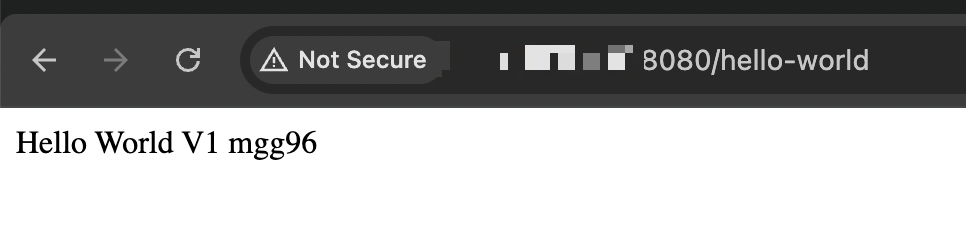
4. Pod이 3개로 늘어나고 나서 hello-world 서비스를 브라우저로 접근하면 Pod가 돌아가면서 동작하여 서비스가 됨을 알 수 있다.

5. kubectl scale deployment를 통해 내부적으로 어떤 동작이 있었는지 보기 위해 event를 확인해보면 pod 2개가 추가로 생성된 것을 확인할 수 있다.
@cloudshell:~ (proud-curve)$ kubectl get events --sort-by=.metadata.creationTimestamp
LAST SEEN   TYPE     REASON              OBJECT                                     MESSAGE
17m         Normal   Scheduled           pod/hello-world-rest-api-8c7449fd-bw2hn    Successfully assigned default/hello-world-rest-api-8c7449fd-bw2hn to gke-in28minutes-cluster-default-pool-24f9f7fb-xq70
17m         Normal   Killing             pod/hello-world-rest-api-8c7449fd-f7lh2    Stopping container hello-world-rest-api
17m         Normal   SuccessfulCreate    replicaset/hello-world-rest-api-8c7449fd   Created pod: hello-world-rest-api-8c7449fd-bw2hn
17m         Normal   Pulled              pod/hello-world-rest-api-8c7449fd-bw2hn    Container image "in28min/hello-world-rest-api:0.0.1.RELEASE" already present on machine
17m         Normal   Created             pod/hello-world-rest-api-8c7449fd-bw2hn    Created container hello-world-rest-api
17m         Normal   Started             pod/hello-world-rest-api-8c7449fd-bw2hn    Started container hello-world-rest-api
12m         Normal   SuccessfulCreate    replicaset/hello-world-rest-api-8c7449fd   Created pod: hello-world-rest-api-8c7449fd-fzg7d
12m         Normal   ScalingReplicaSet   deployment/hello-world-rest-api            Scaled up replica set hello-world-rest-api-8c7449fd to 3 from 1
12m         Normal   Scheduled           pod/hello-world-rest-api-8c7449fd-fzg7d    Successfully assigned default/hello-world-rest-api-8c7449fd-fzg7d to gke-in28minutes-cluster-default-pool-24f9f7fb-vzdc
12m         Normal   Scheduled           pod/hello-world-rest-api-8c7449fd-mgg96    Successfully assigned default/hello-world-rest-api-8c7449fd-mgg96 to gke-in28minutes-cluster-default-pool-24f9f7fb-6q96
12m         Normal   SuccessfulCreate    replicaset/hello-world-rest-api-8c7449fd   Created pod: hello-world-rest-api-8c7449fd-mgg96
12m         Normal   Pulling             pod/hello-world-rest-api-8c7449fd-fzg7d    Pulling image "in28min/hello-world-rest-api:0.0.1.RELEASE"
12m         Normal   Pulling             pod/hello-world-rest-api-8c7449fd-mgg96    Pulling image "in28min/hello-world-rest-api:0.0.1.RELEASE"
12m         Normal   Created             pod/hello-world-rest-api-8c7449fd-fzg7d    Created container hello-world-rest-api
12m         Normal   Started             pod/hello-world-rest-api-8c7449fd-mgg96    Started container hello-world-rest-api
12m         Normal   Created             pod/hello-world-rest-api-8c7449fd-mgg96    Created container hello-world-rest-api
12m         Normal   Pulled              pod/hello-world-rest-api-8c7449fd-mgg96    Successfully pulled image "in28min/hello-world-rest-api:0.0.1.RELEASE" in 3.116s (3.116s including waiting). Image size: 88504325 bytes.
12m         Normal   Started             pod/hello-world-rest-api-8c7449fd-fzg7d    Started container hello-world-rest-api
12m         Normal   Pulled              pod/hello-world-rest-api-8c7449fd-fzg7d    Successfully pulled image "in28min/hello-world-rest-api:0.0.1.RELEASE" in 3.163s (3.163s including waiting). Image size: 88504325 bytes.
Deployment
다운타임 없이 새로운 버전을 배포할 수 있도록 Pod와 Replicaset의 배포를 관리한다.
@cloudshell:~ (proud-curve)$ kubectl explain deployment
GROUP:      apps
KIND:       Deployment
VERSION:    v1

DESCRIPTION:
    Deployment enables declarative updates for Pods and ReplicaSets.

FIELDS:
  apiVersion    <string>
    APIVersion defines the versioned schema of this representation of an object.
    Servers should convert recognized schemas to the latest internal value, and
    may reject unrecognized values. More info:
    https://git.k8s.io/community/contributors/devel/sig-architecture/api-conventions.md#resources

  kind  <string>
    Kind is a string value representing the REST resource this object
    represents. Servers may infer this from the endpoint the client submits
    requests to. Cannot be updated. In CamelCase. More info:
    https://git.k8s.io/community/contributors/devel/sig-architecture/api-conventions.md#types-kinds

  metadata      <ObjectMeta>
    Standard object's metadata. More info:
    https://git.k8s.io/community/contributors/devel/sig-architecture/api-conventions.md#metadata

  spec  <DeploymentSpec>
    Specification of the desired behavior of the Deployment.

  status        <DeploymentStatus>
    Most recently observed status of the Deployment.
1. 애플리케이션 도커 이미지를 변경한다.
@cloudshell:~ (proud-curve)$ kubectl get rs -o wide
NAME                            DESIRED   CURRENT   READY   AGE   CONTAINERS             IMAGES                                       SELECTOR
hello-world-rest-api-8c7449fd   3         3         3       17h   hello-world-rest-api   in28min/hello-world-rest-api:0.0.1.RELEASE   app=hello-world-rest-api,pod-template-hash=8c7449fd
@cloudshell:~ (proud-curve)$ kubectl set image deployment hello-world-rest-api hello-world-rest-api=in28min/hello-world-rest-api:0.0.2.RELEASE
deployment.apps/hello-world-rest-api image updated
2. 이미지 변경을 하게 되면 애플리케이션 버전2로 deployment 된 것인데, 이 과정에서 replicaset은 새로운 이름으로 생성이 되고 pod도 새 버전의 애플리케이션을 위한 pod이 구성된다.
@cloudshell:~ (proud-curve)$ kubectl get rs -o wide
NAME                             DESIRED   CURRENT   READY   AGE   CONTAINERS             IMAGES                                       SELECTOR
hello-world-rest-api-89b8d4c97   3         3         3       25s   hello-world-rest-api   in28min/hello-world-rest-api:0.0.2.RELEASE   app=hello-world-rest-api,pod-template-hash=89b8d4c97
hello-world-rest-api-8c7449fd    0         0         0       18h   hello-world-rest-api   in28min/hello-world-rest-api:0.0.1.RELEASE   app=hello-world-rest-api,pod-template-hash=8c7449fd
@cloudshell:~ (proud-curve)$ kubectl get pods -o wide
NAME                                   READY   STATUS    RESTARTS   AGE   IP          NODE                                                 NOMINATED NODE   READINESS GATES
hello-world-rest-api-89b8d4c97-6l564   1/1     Running   0          44s   10.44.1.9   gke-in28minutes-cluster-default-pool-24f9f7fb-xq70   <none>           <none>
hello-world-rest-api-89b8d4c97-6w9w5   1/1     Running   0          41s   10.44.2.8   gke-in28minutes-cluster-default-pool-24f9f7fb-6q96   <none>           <none>
hello-world-rest-api-89b8d4c97-m88z8   1/1     Running   0          39s   10.44.0.8   gke-in28minutes-cluster-default-pool-24f9f7fb-vzdc   <none>           <none>
3. 내부적으로 일어난 동작을 보면 새로운 relicaset을 먼저 생성한 후 pod 1개를 먼저 생성하여 image를 내려받아 컨테이너를 실행하고 기존 replicaset의 개수를 2로 줄이면서 기존 container를 중지하고 pod을 삭제한다. 이 작업을 replicas 개수만큼 3번만큼 진행하여 기존 relicaset에서 실행되던 pod을 순차적으로 신규 relicaset으로 이관되게 된다. 롤링 업데이트 전략이 적용된 예시이다.
@cloudshell:~ (proud-curve)$ kubectl get events --sort-by=.metadata.creationTimestamp
LAST SEEN   TYPE     REASON              OBJECT                                      MESSAGE
...
6m36s       Normal   SuccessfulCreate    replicaset/hello-world-rest-api-89b8d4c97   Created pod: hello-world-rest-api-89b8d4c97-6l564
6m35s       Normal   Scheduled           pod/hello-world-rest-api-89b8d4c97-6l564    Successfully assigned default/hello-world-rest-api-89b8d4c97-6l564 to gke-in28minutes-cluster-default-pool-24f9f7fb-xq70
6m36s       Normal   ScalingReplicaSet   deployment/hello-world-rest-api             Scaled up replica set hello-world-rest-api-89b8d4c97 to 1
6m35s       Normal   Pulling             pod/hello-world-rest-api-89b8d4c97-6l564    Pulling image "in28min/hello-world-rest-api:0.0.2.RELEASE"
6m34s       Normal   Started             pod/hello-world-rest-api-89b8d4c97-6l564    Started container hello-world-rest-api
6m34s       Normal   Created             pod/hello-world-rest-api-89b8d4c97-6l564    Created container hello-world-rest-api
6m34s       Normal   Pulled              pod/hello-world-rest-api-89b8d4c97-6l564    Successfully pulled image "in28min/hello-world-rest-api:0.0.2.RELEASE" in 1.45s (1.45s including waiting). Image size: 88504316 bytes.
6m33s       Normal   Pulling             pod/hello-world-rest-api-89b8d4c97-6w9w5    Pulling image "in28min/hello-world-rest-api:0.0.2.RELEASE"
6m33s       Normal   ScalingReplicaSet   deployment/hello-world-rest-api             Scaled down replica set hello-world-rest-api-8c7449fd to 2 from 3
6m33s       Normal   Killing             pod/hello-world-rest-api-8c7449fd-bw2hn     Stopping container hello-world-rest-api
6m33s       Normal   SuccessfulDelete    replicaset/hello-world-rest-api-8c7449fd    Deleted pod: hello-world-rest-api-8c7449fd-bw2hn
6m33s       Normal   Scheduled           pod/hello-world-rest-api-89b8d4c97-6w9w5    Successfully assigned default/hello-world-rest-api-89b8d4c97-6w9w5 to gke-in28minutes-cluster-default-pool-24f9f7fb-6q96
6m33s       Normal   ScalingReplicaSet   deployment/hello-world-rest-api             Scaled up replica set hello-world-rest-api-89b8d4c97 to 2 from 1
6m33s       Normal   SuccessfulCreate    replicaset/hello-world-rest-api-89b8d4c97   Created pod: hello-world-rest-api-89b8d4c97-6w9w5
6m32s       Normal   Started             pod/hello-world-rest-api-89b8d4c97-6w9w5    Started container hello-world-rest-api
6m32s       Normal   Created             pod/hello-world-rest-api-89b8d4c97-6w9w5    Created container hello-world-rest-api
6m32s       Normal   Pulled              pod/hello-world-rest-api-89b8d4c97-6w9w5    Successfully pulled image "in28min/hello-world-rest-api:0.0.2.RELEASE" in 879ms (879ms including waiting). Image size: 88504316 bytes.
6m31s       Normal   Scheduled           pod/hello-world-rest-api-89b8d4c97-m88z8    Successfully assigned default/hello-world-rest-api-89b8d4c97-m88z8 to gke-in28minutes-cluster-default-pool-24f9f7fb-vzdc
6m31s       Normal   Pulling             pod/hello-world-rest-api-89b8d4c97-m88z8    Pulling image "in28min/hello-world-rest-api:0.0.2.RELEASE"
6m31s       Normal   SuccessfulDelete    replicaset/hello-world-rest-api-8c7449fd    Deleted pod: hello-world-rest-api-8c7449fd-mgg96
6m31s       Normal   Killing             pod/hello-world-rest-api-8c7449fd-mgg96     Stopping container hello-world-rest-api
6m31s       Normal   SuccessfulCreate    replicaset/hello-world-rest-api-89b8d4c97   Created pod: hello-world-rest-api-89b8d4c97-m88z8
6m31s       Normal   ScalingReplicaSet   deployment/hello-world-rest-api             Scaled down replica set hello-world-rest-api-8c7449fd to 1 from 2
6m31s       Normal   ScalingReplicaSet   deployment/hello-world-rest-api             Scaled up replica set hello-world-rest-api-89b8d4c97 to 3 from 2
6m30s       Normal   Started             pod/hello-world-rest-api-89b8d4c97-m88z8    Started container hello-world-rest-api
6m30s       Normal   Pulled              pod/hello-world-rest-api-89b8d4c97-m88z8    Successfully pulled image "in28min/hello-world-rest-api:0.0.2.RELEASE" in 856ms (856ms including waiting). Image size: 88504316 bytes.
6m30s       Normal   Created             pod/hello-world-rest-api-89b8d4c97-m88z8    Created container hello-world-rest-api
6m29s       Normal   Killing             pod/hello-world-rest-api-8c7449fd-fzg7d     Stopping container hello-world-rest-api
6m29s       Normal   SuccessfulDelete    replicaset/hello-world-rest-api-8c7449fd    Deleted pod: hello-world-rest-api-8c7449fd-fzg7d
6m29s Normal ScalingReplicaSet deployment/hello-world-rest-api Scaled down replica set hello-world-rest-api-8c7449fd to 0 from 1'Kubernetes' 카테고리의 다른 글
| GKE 구글 클라우드 쉘을 이용하여 애플리케이션을 쿠버네티스 클러스터에 배포하기 (0) | 2025.02.16 |
|---|---|
| GKE(구글 쿠버네티스 엔진) 클러스터 생성 (1) | 2025.02.16 |